MudForge is free. It runs on Windows, Mac, Linux, iPhone, Android and in your browser, and it is the client the game ships its own windows for: a map of the town that follows you, a map of the room you stand in, and a chat window for the channels.
Play with MudForge
Get MudForge from mudforge.org (opens in a new tab), or play it in your browser with nothing to install (the first button above).
Connect to islesmud.org, port 3232. The browser button connects you by itself.
The first time you log in, MudForge asks whether to install IslesMUD UI, the game's own windows. Say yes, and the two maps open. When we improve them, MudForge offers the update the same way, and your windows stay where you put them.
What you see
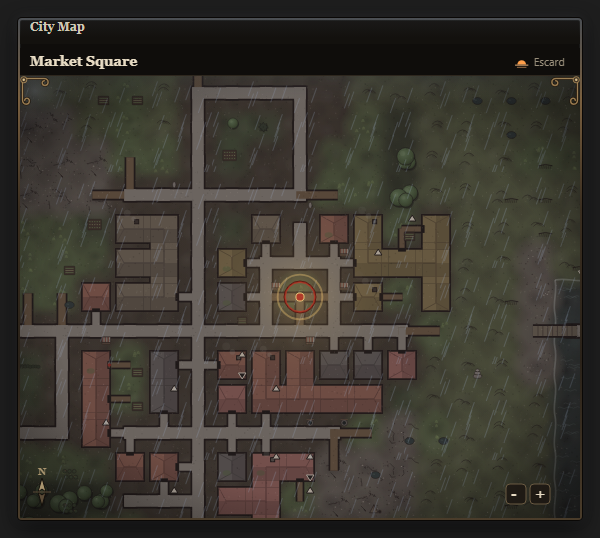
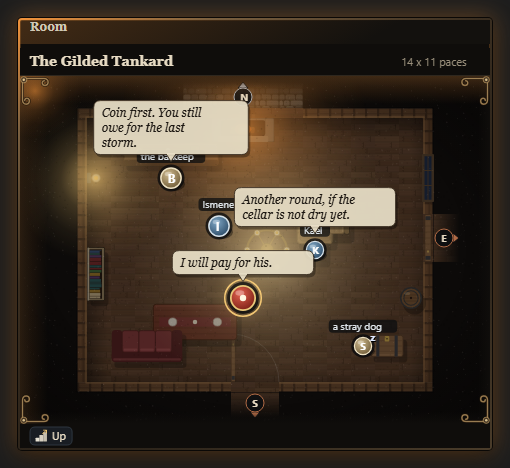
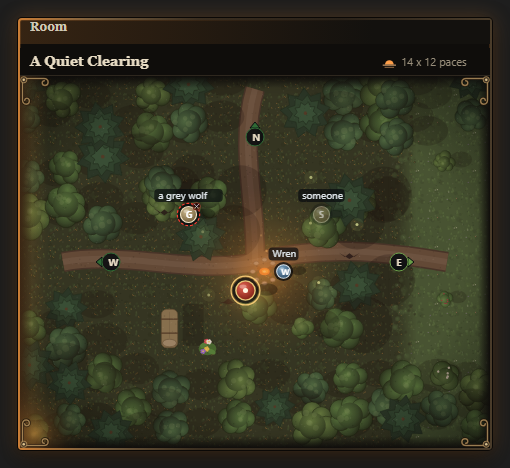
- MudForge's Chat window gathers OOC, tells, your group and the other channels, so they never scroll the story away. If it isn't showing, open it and it fills by itself. In the game,
client chatchooses whether channel lines also stay in the main window. - The maps show only what your character could see. In the dark, asleep or blind, they show nothing at all.
- In the game,
help clienttells you more.
Playing with a screen reader
Type vimode once you are in. It makes the game's maps, grids and graphs readable with a screen reader, and turns on brief mode. Pictures drawn with letters and symbols can be marked so that a screen reader skips them and reads a short description instead.
In the game, help vimode and help screenreader explain more. To suggest a change, type idea in the game.
Other clients
Any MUD client connects. These play the game as text:
- Mudlet
- A popular, free, and open-source client for Windows, macOS, and Linux. Highly customizable, and it receives the game's map and chat data for scripts of your own.
- MUSHclient
- Another widely used free client for Windows with strong scripting capabilities.
- Fado
- A free, simple client for Android devices.
Whichever you choose, connect to this address and port:
- Address
- islesmud.org
- Port
- 3232
Or play in your browser with the web client of our friends at Dark Wizardry (opens in a new tab).
Once you connect, you'll be prompted to create a character if you're new, or enter your existing character name and password.
Welcome to the Isles!